- Pinning makes interception harder, but it is a layer, not a guarantee.
- Testers check how pinning is implemented, how easily it is bypassed, and what sits behind it.
- Use the Network Security Config, plan for key rotation, and never rely on pinning alone.
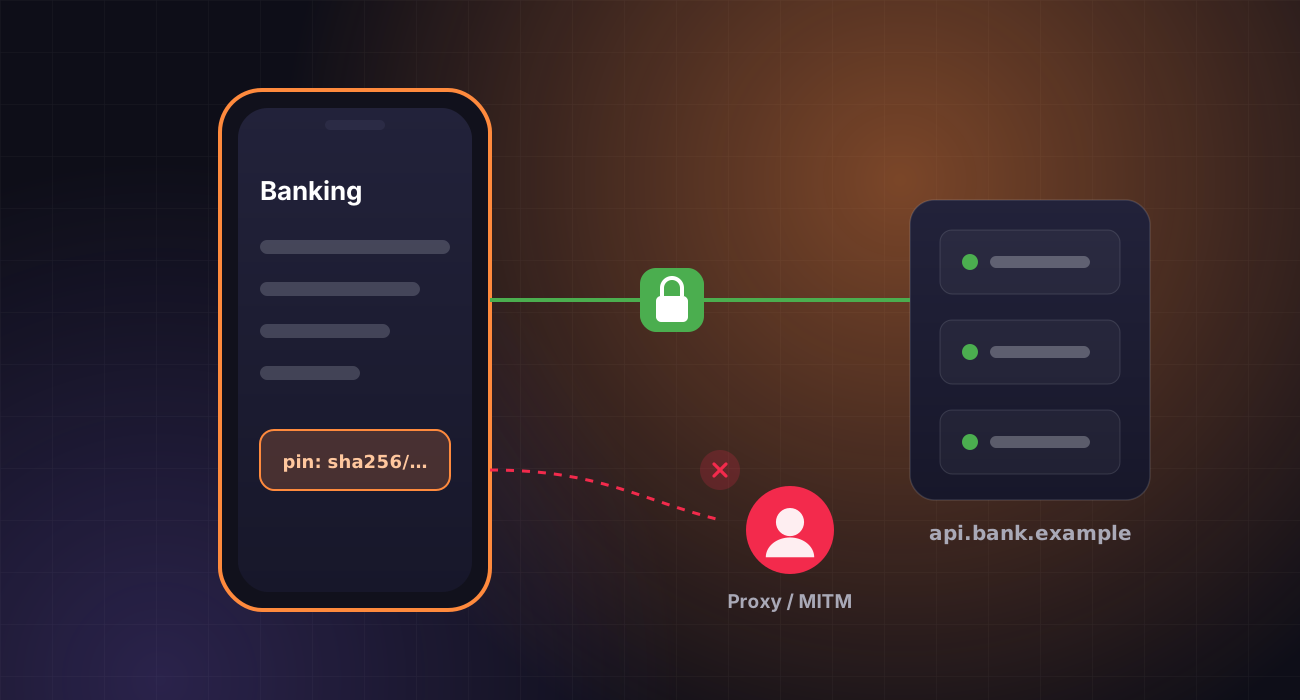
Certificate pinning tells an app to trust only specific certificates or public keys for your API, which blocks casual interception with a proxy. During a pentest, it is also one of the first controls we test.
Here is what testers look at when an Android app pins certificates, and how to implement pinning without breaking releases.
How pinning is implemented
Android supports pinning declaratively through the Network Security Config, and libraries such as OkHttp offer a CertificatePinner. Testers check which approach is used, whether every domain the app calls is covered, and whether debug overrides or permissive trust settings slipped into the release build.
How hard it is to bypass
On a rooted test device, dynamic instrumentation can hook trust checks and disable pinning. We measure how much effort that takes, and whether the app also detects tampering or root. Pinning raises the cost of interception; it does not make the API safe to expose.
 PentestX in practiceFIND-0214 · /api/orders
Every fix in PentestX triggers a scoped retest, so “resolved” always means verified, with evidence attached. See how retesting works →
What sits behind it
Once traffic is visible, testers examine the APIs the app calls: authorisation on every object, token handling, rate limiting and data returned that the app never displays. Many critical mobile findings are really backend findings.
Plan for key rotation
Pin to public keys rather than leaf certificates, include a backup pin, and set an expiry so a forced certificate change does not lock users out. Ship pin updates well before the old key is retired.
Pin, then test what is behind it
Pinning is a sensible layer for apps that handle sensitive data. Pair it with strong server-side controls, and test both together.
PentestX Android and iOS assessments cover the binary, local storage, pinning and the backend APIs, with findings mapped to the OWASP Mobile Top 10 and MASVS.