- Most bucket exposures come from a handful of settings, not from exotic attacks.
- Block Public Access at the account level is the strongest single control.
- Review bucket policies, ACLs and cross-account access together, then keep monitoring.
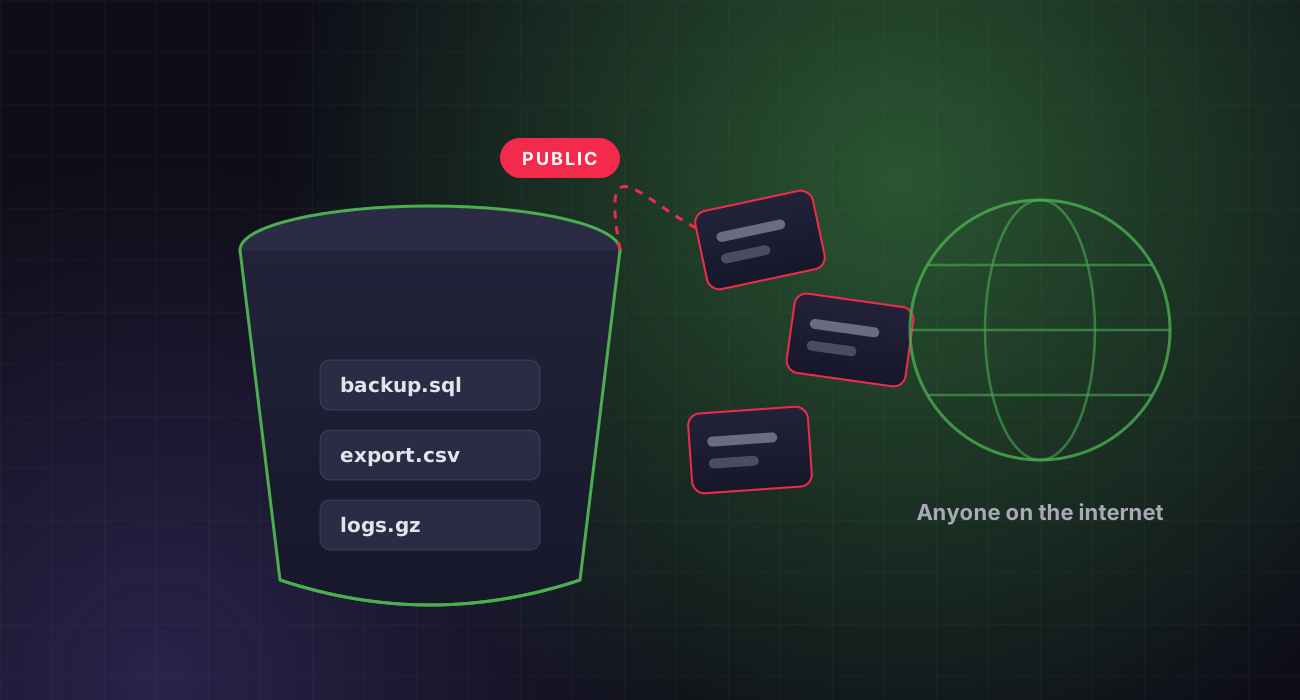
Publicly readable storage remains one of the most common causes of cloud data exposure. Backups, exports and logs end up in a bucket that someone opened “just for a minute”.
Here is where exposure usually comes from in Amazon S3, and a practical checklist to find and close it across your accounts.
How buckets become public
There are three common paths: a bucket policy that grants access to the principal “*”, legacy ACLs that grant AllUsers or AuthenticatedUsers, and access points or cross-account roles that are broader than intended. Static website hosting and pre-signed URLs with long expiry add more risk.
Turn on Block Public Access everywhere
S3 Block Public Access can be enforced at the account level and overrides public policies and ACLs on every bucket. New buckets have it on by default, but older buckets and accounts often do not. Enable it at the account level and treat any exception as a reviewed, documented decision.
Review policies, ACLs and access points
For every bucket, check the bucket policy for wildcard principals and missing conditions, confirm ACLs are disabled with Object Ownership set to “bucket owner enforced”, and list access points and cross-account grants. IAM Access Analyzer highlights buckets shared outside your account or organisation.
 PentestX in practiceFIND-0214 · /api/orders
Every fix in PentestX triggers a scoped retest, so “resolved” always means verified, with evidence attached. See how retesting works →
Know what is inside and who reads it
Enable default encryption, server access logging or CloudTrail data events for sensitive buckets, and versioning where deletion would hurt. Tag buckets by data classification so a public bucket full of marketing images is never confused with one holding database exports.
Make it continuous
Bucket settings drift as teams ship. Re-run the review on a schedule, alert on policy changes, and include storage in every cloud assessment.
PentestX cloud assessments use read-only access to review storage, IAM, network exposure and secrets across AWS, Azure, GCP and Oracle Cloud, with findings mapped to the CIS benchmarks.